
TL;DR:
- Pre-ordering coffee through apps or websites reduces wait times, ensures freshness, and enables precise customization.
- Timing and communication are crucial for successful pickup, with lead times varying from minutes to two weeks depending on the order type.
Pre-ordering coffee is the process of placing your order in advance through a mobile app, website, or phone call so your drink or beans are ready when you arrive. Done right, it eliminates wait times, guarantees availability, and gives you control over freshness in a way that walking up to a counter never can. Apps like the Starbucks mobile app and platforms from specialty roasters like Thirdspacecoffee have made advance ordering faster and more reliable than ever. Whether you want a single latte ready at 8 a.m. or a bulk order for a team meeting, this guide covers every step.
How to pre-order coffee: tools and platforms that work
The method you choose to pre-order coffee determines how much control you have over timing, customization, and freshness.
Mobile apps are the most common starting point. The Starbucks app lets you build your order, select a pickup time window in 5-minute increments, and notify baristas the moment you arrive. That level of precision means your drink is made fresh, not sitting on a counter cooling down. The Joe Coffee app offers a similar experience at independent cafés across the country, letting you browse menus and pay ahead without standing in line.
Online specialty roaster websites serve a different need. These platforms let you order whole bean coffee roasted specifically for your order, with roast-to-order models shipping beans within 24 to 48 hours of roasting. That means your coffee arrives within 3 to 4 days of the roast date, far fresher than anything sitting on a grocery store shelf.
Direct phone or email orders remain the best option for mobile coffee vans and event catering. Mobile coffee vendors require designated collection points approved by site management, so a quick call ahead confirms logistics before your event day arrives.
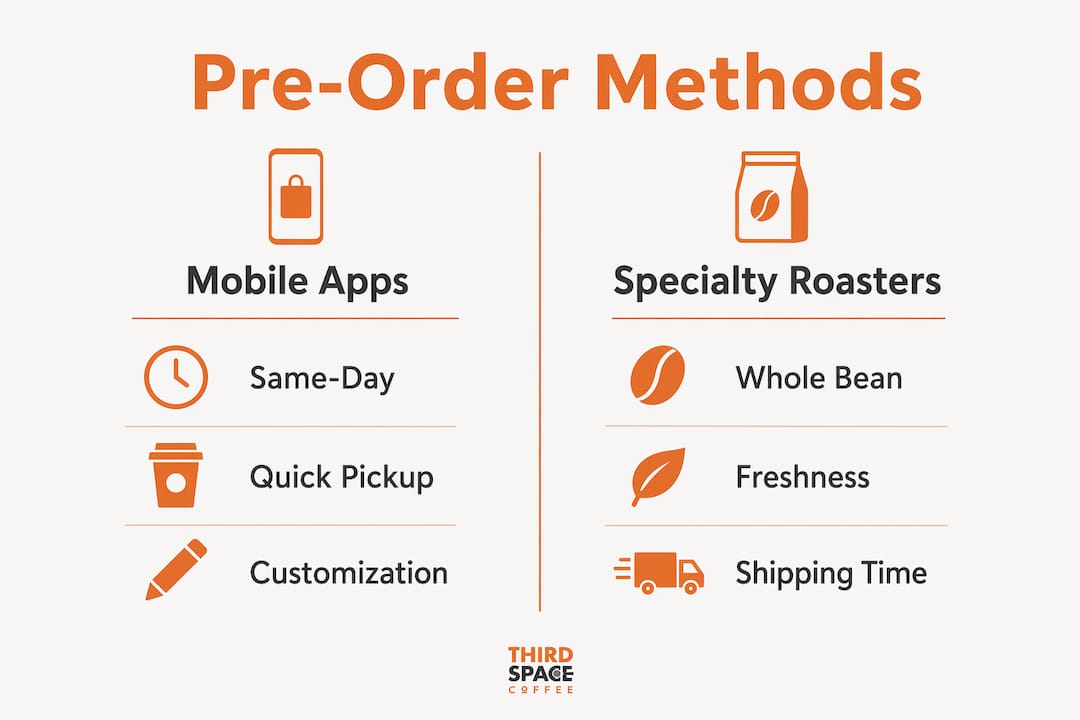
Here is a quick comparison of the three main ordering methods:
| Method | Best for | Lead time needed | Customization |
|---|---|---|---|
| Mobile app (e.g., Starbucks) | Daily drinks, quick pickup | Minutes to hours | High |
| Online roaster website | Whole bean, fresh delivery | 3 to 7 days | Medium to high |
| Phone or email (events) | Bulk orders, catering | 24 to 72 hours | High |
Pro Tip: Enable push notifications in whatever app you use. App push alerts for order ready status and driver arrival are the single fastest way to time your pickup without hovering near the counter.
How to schedule and time your coffee pre-order for pickup or events
Timing is where most pre-orders go wrong. Selecting the right pickup window or lead time is not optional. It is the difference between a fresh cup and a lukewarm disappointment.
For daily café pickup, the process is straightforward. Mobile apps typically offer pickup windows in short increments, so you place your order 10 to 20 minutes before you plan to arrive. Ordering too far in advance means your drink sits waiting. Ordering too late means the barista is still making it when you walk in.
For specialty whole bean orders, the timeline is longer. Specialty roasters ship within 24 to 48 hours of roasting, which means you can receive beans at peak freshness within a week of ordering. Subscriptions that roast to order follow the same model. Subscriptions shipping from warehouse inventory may send beans that are weeks old before they reach your door, which is a meaningful quality difference.
Bulk and event orders require the most planning. Pre-ordering specialty roasted whole bean coffee in larger quantities typically involves a 7 to 14 business day lead time, since batches cycle every 2 to 3 weeks and special orders often require full-case quantities. For office coffee boxes or catering setups, same-day large orders require giving vendors at least one to two hours of preparation time.
Here is a reference table for common pre-order scenarios:
| Scenario | Recommended lead time | Notes |
|---|---|---|
| Single café drink pickup | 10 to 20 minutes | Use mobile app with pickup window |
| Office coffee box (same day) | 1 to 2 hours minimum | Call ahead to confirm availability |
| Whole bean online order | 3 to 7 days | Confirm roast-to-order status |
| Bulk specialty roast order | 7 to 14 business days | May require full-case minimum |
| Event catering setup | 24 to 72 hours | Confirm collection point logistics |
- Decide your pickup date and work backward from there.
- Check whether the vendor roasts to order or ships from stock.
- Add buffer time for shipping or preparation delays.
- Confirm your order with the vendor 24 hours before pickup.
Pro Tip: For events, always ask the vendor to confirm the designated collection point in writing. Clear pickup point coordination prevents the most common event-day confusion.
Choosing the right coffee and grind when ordering ahead
Selecting the right coffee before you place your order is as important as the order itself. The wrong grind or an old roast date will undercut every other effort you make.
The most important number on any bag of specialty coffee is the roast date, not the "best by" date. Consumer confusion around best-by dates causes many buyers to miss the actual freshness indicator. Experts prioritize roast date because coffee is at peak flavor between 5 and 21 days after roasting, once CO2 degassing has settled. A bag labeled "best by December 2026" tells you almost nothing useful if you do not know when it was roasted. You can learn more about how roasting affects flavor in this coffee roasting guide from Thirdspacecoffee.
Whole bean coffee stays fresh longer because grinding exposes more surface area to oxygen. If you own a burr grinder, ordering whole bean and grinding at home gives you noticeably better flavor than pre-ground. If you do not own a grinder, ordering pre-ground matched to your brew method produces better results than generic pre-ground, which stales faster due to increased oxygen exposure.
When selecting coffee for a pre-order, check for these criteria:
- Roast date: Visible on the bag or product page, ideally within the last 2 weeks
- Origin transparency: Single-origin or clearly labeled blends signal quality sourcing
- Grind options: Look for vendors offering espresso, drip, French press, and pour-over grinds
- Roast-to-order status: Confirms beans are roasted after your purchase, not pulled from stock
- Whole bean availability: Gives you maximum freshness control if you grind at home
Pro Tip: When pre-ordering whole bean coffee online, look for roasters that print the roast date directly on the product page before checkout. If the roast date is not listed, the beans were likely roasted weeks ago.
Step-by-step guide to placing a coffee pre-order smoothly
A clean pre-order process takes less than five minutes once you know what to prepare. Here is the full sequence.
Before you order, confirm these basics:
- You have an account created with the app or website
- Your payment method is saved and current
- You know the exact pickup location and any access requirements
- For events, you have confirmed the collection point with the venue
For mobile app orders (daily drinks):
- Open the app and browse the menu to build your drink with full customization.
- Select your pickup location from the map.
- Choose your pickup time window. Most apps offer slots in 5 to 15 minute increments.
- Review your order and confirm payment.
- Enable push notifications so you receive an alert when your order is ready.
- Arrive at the designated pickup area, not the main counter, to collect your drink.
For online roaster or whole bean orders:
- Browse by origin, roast level, and roast date. Prioritize roast-to-order options.
- Select your grind type based on your brew method at home.
- Add to cart and confirm the estimated ship date before checkout.
- Complete payment and save your order confirmation number.
- Track shipping and plan to use the beans within 2 to 3 weeks of the roast date.
For event or bulk orders:
- Contact the vendor by phone or email at least 48 to 72 hours in advance.
- Specify the number of servings, drink types, and any dietary requirements.
- Confirm the collection point and who will be on-site to receive the order.
- Request a written confirmation with the order details and arrival window.
Common mistakes to avoid during any pre-order:
- Selecting the wrong pickup location when a chain has multiple nearby stores
- Forgetting to specify grind type on whole bean orders
- Placing a bulk order without confirming minimum quantity requirements
- Not checking the app for order status updates before heading to the store
Troubleshooting common coffee pre-order problems
Even well-placed orders run into issues. Knowing how to respond quickly keeps a minor problem from becoming a wasted trip.
Late or missed pickup notifications are the most frequent complaint. If your app notification does not arrive within the expected window, check the order status tab directly rather than waiting. Mobile ordering efficiency depends on app notifications firing correctly, but network delays can affect timing. Refreshing the app manually takes 10 seconds and resolves most cases.
Incorrect or incomplete orders happen most often with complex customizations. If your drink is wrong, show the barista your in-app order confirmation immediately. Most cafés will remake the order without question. For online bean orders, contact the roaster within 24 hours of delivery with a photo of the bag and your order number.
Cancellations and modifications vary by platform. Most mobile apps allow changes up to the point when the barista begins preparing your order. Online roaster orders can typically be modified within a few hours of placement, before the roast cycle begins. For event orders, changes within 24 hours of the event may incur a fee or be declined entirely.
For bulk and office orders, designate one person as the point of contact for the vendor. Splitting communication across multiple people is the fastest way to create duplicate orders or missed details.
Key takeaways
Pre-ordering coffee works best when you match your method to your timeline, confirm freshness indicators before buying, and communicate pickup logistics clearly before the order is placed.
| Point | Details |
|---|---|
| Match method to timeline | Use mobile apps for same-day drinks and roaster websites for fresh whole bean orders. |
| Prioritize roast date | Check the roast date, not the best-by date, to confirm bean freshness before ordering. |
| Plan event orders early | Bulk and catering orders need 24 to 72 hours minimum; specialty roasts need up to 14 days. |
| Confirm pickup logistics | Designate a collection point and enable push notifications to avoid missed pickups. |
| Order grind-specific pre-ground | If you lack a grinder, order pre-ground matched to your brew method for better flavor. |
Why convenience and quality are not a trade-off
I have been ordering coffee ahead for years, and the biggest shift I have noticed is not in the technology. It is in how roasters and cafés have started treating the pre-order as a quality signal rather than just a logistics tool. When a roaster knows your order is coming, they roast for it. That changes the entire freshness equation.
The part most people overlook is the grind decision. I spent two years ordering pre-ground out of convenience before I realized I was losing most of the flavor benefit of ordering from a quality roaster in the first place. Switching to whole bean and grinding at home with a basic burr grinder made a bigger difference than any app feature ever has.
My honest advice: start with one specialty roaster that publishes roast dates and try a single roast-to-order bag. The difference compared to grocery store coffee is not subtle. Once you experience that, the extra planning involved in pre-ordering becomes completely worth it. E-commerce has genuinely shifted coffee buying toward transparency and freshness, and the best roasters have responded by making that information easy to find before you buy.
— Tanya
Order fresh coffee ahead with Thirdspacecoffee
Thirdspacecoffee in Colorado Springs roasts whole bean coffee in-house and offers online ordering for front-of-store pickup, so you get freshly roasted beans without the wait. Whether you are stocking up for the week or planning coffee for an event, the ordering process is built for convenience without cutting corners on quality.
Browse the full lineup of specialty drinks available for pre-order pickup, or explore whole bean options roasted in-house with full roast date transparency. For events and gatherings, Thirdspacecoffee also offers space rental and catering coordination. You can find everything you need for planning a coffee menu that makes your next gathering memorable.
FAQ
What is the easiest way to pre-order coffee for pickup?
The easiest method is a mobile app like the Starbucks app, which lets you select your drink, choose a pickup time window, and receive a notification when your order is ready. For local specialty cafés, check whether they offer online ordering directly through their website.
How far in advance should I pre-order coffee for an event?
For catering or bulk event orders, place your order at least 24 to 72 hours in advance. Specialty roasted whole bean orders for events may require 7 to 14 business days if the roaster operates on a batch cycle.
Is pre-ground coffee a good choice when ordering online?
Pre-ground coffee is a practical option if you do not own a grinder, but you should order grind-specific pre-ground matched to your brew method rather than generic pre-ground. Pre-ground stales faster than whole bean due to oxygen exposure, so plan to use it within two weeks of the roast date.
How do I know if an online coffee order is fresh?
Look for the roast date on the product page before you buy. Roast-to-order roasters ship within 24 to 48 hours of roasting, which means your beans arrive at peak freshness. Avoid vendors that only list a best-by date without a roast date.
Can I modify or cancel a coffee pre-order after placing it?
Most mobile apps allow modifications until the barista begins preparing your order. For online roaster orders, changes are typically possible within a few hours of placement before the roast cycle starts. Event and bulk orders may not be modifiable within 24 hours of the scheduled delivery.