 how-to
How to Find Remote Work Friendly Cafes: A Practical Guide
Table of Contents
- What to Look for in Remote Work Cafes Before You Commit
- Step-by-Step: How to Evaluate a Cafe for Remote Work
- Digital Security and Privacy on Public Wi-Fi
- Best Apps for Finding Remote Work Cafes Near You
- Coffee Shop Remote Work Etiquette for Long-Term Stays
- Your Remote Work Cafe Checklist Before Every Visit
- Common Mistakes Remote Workers Make When Choosing a Cafe
- Frequently Asked Questions
Last Updated: August 4, 2026
Knowing how to find remote work friendly cafes separates productive digital nomads from frustrated laptop warriors. This guide from Third Space Coffee breaks down what to look for, how to vet a space before committing your workday to it, and what mistakes to avoid.
Here's what most guides get wrong: they treat cafe hunting like a Yelp search. The real process is a workspace evaluation, not a restaurant review.
What to Look for in Remote Work Cafes Before You Commit
A remote work friendly cafe provides reliable internet, sufficient power access, comfortable seating, and an atmosphere conducive to sustained concentration, without pressuring guests to vacate after a single purchase.
Start your evaluation before you walk in. Check Google Maps reviews and filter by keywords like "Wi-Fi," "outlet," and "laptop." Look for mentions of table turnover pressure. Comments saying "great for a quick coffee but not for working" tell you everything you need to know.
Reliable Wi-Fi Speed and Bandwidth
Wi-Fi quality is the single most important variable for location-independent workers. The minimum usable threshold for professional remote work is around 25 Mbps download and 10 Mbps upload, which covers video calls, cloud file syncing, and basic development work simultaneously.
The real test is not what the router advertises, it's what you actually get at 10 a.m. on a Tuesday when 15 other people are streaming music and video-calling their teams. According to FCC Broadband Speed Guide, video conferencing requires a minimum of 3 Mbps per stream, but in a shared public Wi-Fi environment, you need significantly more headroom.
Run a speed test with an app like Speedtest by Ookla immediately after connecting, then again an hour later. The delta between those readings tells you more than any single test.
Power Outlet Availability and Seating Capacity
Power outlet availability is where most remote workers get burned. A cafe might have 40 seats and four outlets, all behind a sofa nobody wants to sit on. Walk the floor, identify which tables are near outlets, and check whether those seats are free. If every outlet-adjacent seat is occupied by 9 a.m., that cafe has a structural problem.
Look for chairs with back support and tables at desk height, not coffee-table height. Wooden stools might look great in design magazines, but after three hours your lower back will file a formal complaint.
Step-by-Step: How to Evaluate a Cafe for Remote Work
The following process takes about 15 minutes on your first visit and saves you hours of wasted work time.
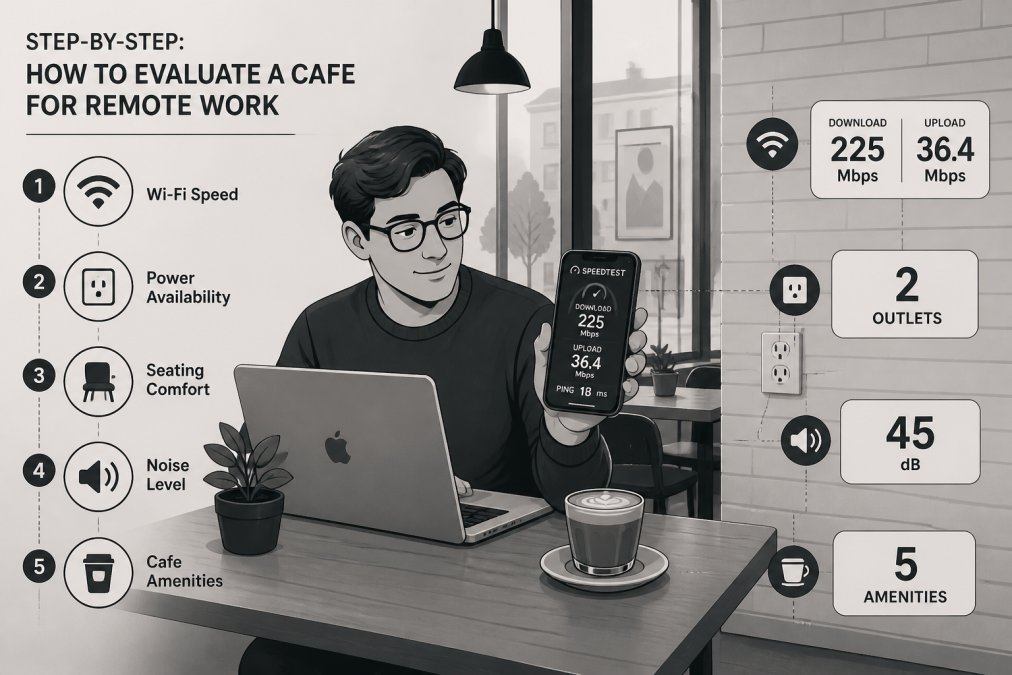
Step 1: Test Connectivity Before Ordering
Connect to the Wi-Fi network before committing to a seat or purchase. Open your speed test app and run a baseline test. Target speeds: 25+ Mbps download, 10+ Mbps upload, and latency under 50ms for video calls.
If the speed test fails, tether to your mobile hotspot or leave. Do not order a full coffee and settle in hoping the connection improves. If the cafe uses a captive portal login that expires every hour, that's a productivity killer.
Step 2: Assess Noise Levels and Ambient Atmosphere
Ambient noise in cafes follows a predictable pattern. Mornings before 10 a.m. are generally quietest. The lunch rush from 11:30 a.m. to 1:30 p.m. spikes noise significantly. Late afternoon from 2 to 4 p.m. often returns to manageable levels.
Your tolerance depends on your work type. Writing, coding, and design work tolerate moderate background noise. Video calls and client meetings require quieter zones. The best remote work cafes have natural acoustic variation: a quieter back area, a louder front counter zone, and seating options that let you self-select based on your task.
Step 3: Check Ergonomic Seating and Table Setup
Find a seat where your screen is at eye level, your elbows are at roughly 90 degrees, and your feet are flat on the floor. Most cafe seating fails at least one of these criteria.
A practical workaround: bring a portable laptop stand and a compact Bluetooth keyboard. This setup converts almost any table into a workable ergonomic configuration. Check table stability too, a wobbly table creates vibration that affects typing accuracy and makes video calls look unprofessional.
Step 4: Review Operating Hours and Peak Busy Times
Operating hours define the outer boundary of your workday. A cafe that closes at 3 p.m. is useless for afternoon work sessions. One that opens at 8 a.m. but fills to capacity by 9 a.m. on weekdays has a narrow usable window.
Google's "Popular Times" feature on the business's Maps listing shows hour-by-hour traffic patterns. Cross-reference this with the outlet and seating situation you mapped earlier. If the only power-accessible seats fill up during peak hours, your productive window is narrower than the operating hours suggest.
Digital Security and Privacy on Public Wi-Fi
Public Wi-Fi networks in cafes are inherently unsecured environments. Without a VPN, every unencrypted data packet you send is potentially visible to anyone on the same network running a packet sniffer. The Cybersecurity and Infrastructure Security Agency guidelines on public Wi-Fi explicitly recommends using a VPN on any public network for sensitive work.
Practical security protocol for cafe work:
- Enable your VPN before connecting to any public Wi-Fi network
- Avoid accessing sensitive financial or client accounts on public networks even with a VPN
- Use two-factor authentication on all work accounts
- Disable automatic Wi-Fi connection on your device to prevent connecting to rogue hotspots
- Log out of work accounts when you leave
Tethering to your phone's mobile hotspot is the most secure option for genuinely sensitive work. It creates a private network that only your devices access.
Best Apps for Finding Remote Work Cafes Near You
Workfrom is the most purpose-built option for remote workers. It crowdsources ratings specifically for Wi-Fi speed, noise level, and power outlet availability. Listings include community notes from other remote workers that surface practical details standard review platforms miss.
The Wifi Map app focuses specifically on connectivity data, aggregating user-reported Wi-Fi passwords and speed ratings.
Google Maps remains the most comprehensive starting point. Filter by "coffee shop," then scan reviews for keywords like "outlet," "Wi-Fi," and "laptop." The Popular Times feature identifies peak hours before you visit.
Yelp can supplement Google Maps for atmosphere and noise level comments, though its filtering for workspace-specific criteria is weaker.
Coffee Shop Remote Work Etiquette for Long-Term Stays
Coffee shop remote work etiquette is the unwritten contract between remote workers and the cafes that tolerate them. The core principle is proportional occupation: your time at the table should be roughly proportional to your spend. A single espresso does not justify a six-hour workday. A reasonable guideline is one purchase every 90 to 120 minutes during busy periods.
Specific etiquette rules:
- Use headphones for all audio, including video calls when possible
- Take calls outside or in a designated quiet area, not at your table
- Do not spread equipment across multiple seats during busy periods
- Ask before plugging in if the outlet is in an unusual location
- Tip proportionally to time spent, not just to the size of your order
Your Remote Work Cafe Checklist Before Every Visit
Before You Leave:
- Check Google Popular Times for current occupancy level
- Confirm operating hours for your full planned work session
- Pack your VPN-enabled device and ensure the VPN app is updated
- Bring a portable laptop stand and external keyboard
- Charge your phone fully in case you need to tether as a backup hotspot
On Arrival:
- Identify outlet-accessible seats before ordering
- Connect to Wi-Fi and run a speed test (target: 25+ Mbps down, 10+ Mbps up)
- Assess ambient noise level and identify quieter zones
- Confirm the cafe's policy on long stays if you plan to be there more than two hours
- Enable your VPN before opening any work applications
During Your Session:
- Purchase at least once every 90-120 minutes during busy periods
- Use headphones for all audio content
- Take calls outside or in a private area when possible
- Monitor your data usage if tethering to a mobile hotspot
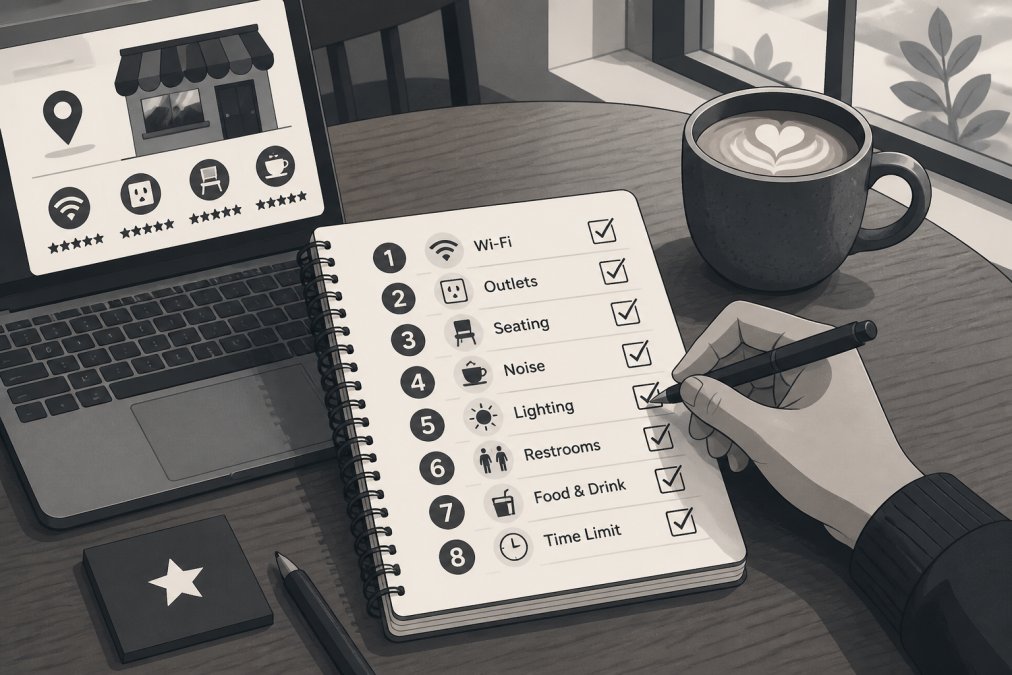
| Evaluation Criteria | What to Check | Red Flag |
|---|---|---|
| Wi-Fi Speed | 25+ Mbps down, 10+ Mbps up | Under 10 Mbps at 10 a.m. |
| Power Outlets | Seats near outlets available | Outlets only behind counter |
| Noise Level | Manageable ambient sound | No quiet zone option |
| Seating Ergonomics | Back support, desk-height tables | Only stools or low tables |
| Operating Hours | Covers your full work session | Closes before 4 p.m. |
| Security | WPA2 network, VPN compatible | Open network, no password |
| Peak Hours | Off-peak windows available | Packed by 9 a.m. daily |
Common Mistakes Remote Workers Make When Choosing a Cafe
The most expensive mistake is choosing based on aesthetics rather than function. A beautifully designed cafe with exposed brick and pour-over coffee is appealing, but if the acoustic design bounces sound off every hard surface and the Wi-Fi is treated as an afterthought, you'll spend more time frustrated than productive.
Another common mistake is visiting once during off-peak hours and assuming that experience represents the typical environment. A cafe that feels calm at 8 a.m. on a Saturday can be genuinely unusable on a Wednesday at noon. Always assess at the time of day you actually plan to work.
Remote workers also frequently overlook the networking and community dimension of cafe selection. According to Harvard Business Review research on coworking and community, workers who feel part of a professional community report significantly higher levels of work-life balance satisfaction. A cafe that attracts a consistent remote-working crowd offers something valuable.
Finally, many remote workers underestimate the value of maintaining a rotation of two or three vetted locations. No single cafe is reliably available every day. Outlet seats get taken, events book out the space, the router goes down. The productive approach prevents last-minute scrambling for connectivity.
Frequently Asked Questions
How do I know if a coffee shop is laptop-friendly before I visit?
Check the cafe's website or Google listing for mentions of Wi-Fi, outlets, or coworking. Look at recent Google and Yelp reviews and filter for keywords like 'laptop,' 'remote work,' or 'outlets.' Apps like Workfrom and The Wifi Map let users report outlet availability and bandwidth. Calling ahead to ask about seating capacity and peak hours takes about two minutes and saves a wasted trip.
What should I look for in a cafe for remote work?
Prioritize reliable high-speed internet with enough bandwidth for video calls, accessible power outlets, and ergonomic seating that supports a full workday. Ambient noise levels matter too: a quiet zone or moderate background music is productive; a loud, crowded space is not. Also check operating hours, table turnover pressure, and whether the cafe welcomes laptop workers during peak hours before settling in as your regular workspace.
What are the best apps for finding remote work cafes?
Workfrom is the most widely used app for locating remote-friendly cafes in U.S. cities; it includes crowd-sourced Wi-Fi speed ratings and noise level reports. The Wifi Map and Yelp's filter for 'Good for Working' are also useful starting points. Google Maps reviews frequently mention outlet availability and laptop-friendliness. For Colorado Springs specifically, combining these apps with local community boards gives the most accurate, up-to-date picture.
Is it rude to work from a coffee shop for a long time?
Occupying a table for hours without buying anything is generally considered poor coffee shop remote work etiquette. A practical rule: purchase something every 90 minutes to two hours, avoid spreading across multiple seats during busy periods, and use headphones for calls. If the cafe is filling up, relocate to a less-trafficked spot or ask staff if extended stays are welcome. Many remote-friendly cafes openly encourage longer visits.
How do you stay secure on public Wi-Fi at a cafe?
Use a VPN on any public Wi-Fi network to encrypt your traffic and protect sensitive data. Avoid accessing banking or confidential work files without one. Turn off file sharing and AirDrop, and confirm you are connecting to the cafe's official network, not a spoofed hotspot with a similar name. If the connection feels slow or unreliable, tethering to your phone's mobile hotspot is a safer fallback for high-stakes work sessions.
Finding a reliable workspace is genuinely harder than it should be, and the stakes are real when your productivity depends on connectivity and focus. Third Space Coffee in Colorado Springs offers a welcoming environment built specifically around community and collaboration, with in-house roasted beans and flexible meeting room rental options for when your work demands more than a cafe table. Visit Third Space Coffee and find a space that works as hard as you do.
This article was written using GrandRanker